

No Comments on A Review of ClinicalKey 302
Jeffery Wagner, MSLIS
Collection Development & Digital Resource Management Librarian
Penn State University College of Medicine & Hershey Medical Center
Introduction
ClinicalKey is a comprehensive clinical decision support platform published by Elsevier that provides healthcare professionals with evidence-based content at the point of care. Designed for healthcare providers across all specialties and levels of experience, the platform integrates clinical overviews, drug monographs, practice guidelines, reference books, journals, procedure videos, and multimedia resources into a single searchable interface. Since its initial launch, ClinicalKey has undergone significant improvements. Recent layout changes for medical schools provide for easier differentiation between clinical resources — those most used at the bedside — and study resources — those most used when students are studying for exams or boards. The most notable update to ClinicalKey comes with the introduction of ClinicalKey AI in 2024, which uses generative artificial intelligence to transform how users access and synthesize medical evidence.1
Content
ClinicalKey provides access to a broad array of clinical content designed to support evidence-based practice across medical specialties. The platform’s core content includes proprietary Elsevier clinical overviews and drug information; industry-leading medical reference texts such as Braunwald’s Heart Disease, Goldman-Cecil Medicine, and Nelson Textbook of Pediatrics; and clinical practice guidelines from leading medical societies including the ACC, AACE, ACEP, CHEST, AGA, and ESMO.2
Recent content expansions have significantly strengthened the platform’s evidence base. ClinicalKey has increased its full-text journal coverage to include high-impact titles such as The Lancet family of journals, Chest, and New England Journal of Medicine along with cross-specialty abstracts from over 1,100 journals. The platform also provides procedure videos and multimedia content, all updated daily to ensure access to the latest published evidence.2
Features/Functionality
ClinicalKey features an intuitive interface with smart search technology that enables clinicians to quickly locate relevant evidence-based content. The platform supports personalization, EHR integration via SMART (Substitutable Medical Applications and Reusable Technologies) on FHIR (Fast Healthcare Interoperability Resources) single sign-on, CME and MOC credit tracking, and link resolver support to connect users to their institution’s full-text holdings.2
The introduction of ClinicalKey AI represents the platform’s most significant recent functional advancement. Built on a Retrieval Augmented Generation (RAG) architecture combining multiple large language models (LLMs) with a vectored content database, ClinicalKey AI enables clinicians to ask questions in natural language and receive concise, evidence-based responses with direct citations. Real-time citation validation ensures that every assertion in AI-generated responses is verified against cited references, ensuring trust and transparency.1 A future review should cover ClinicalKey AI in greater detail.
For medical schools, the updated differentiation between clinical and study resources provides relief for users when navigating between tools and resources needed for providers at the bedside and those that medical students need for learning or exam preparation. When viewing the Clinical References page, there is a main search bar and within it, one can filter between the following categories.
- Books
- Journals
- Clinical Overviews
- Clinical Trials
- Drug Monographs
- Guidelines
- Patient Education
- Multimedia
- Procedure Videos
- Clinical Calculators
- Clinical Focus
The last option, Clinical Focus, is a search filter that shows combined results from images, drug monographs, guidelines, patient education, clinical overviews, videos, and procedure videos. Journal guideline articles may also appear in the search results. Another important distinction between Clinical References and the Study Resources pages is access to journal holdings through ClinicalKey is only available through the Clinical References page.
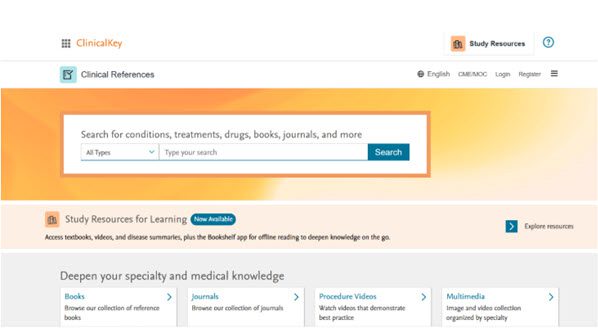
Image 1: Screenshot of Clinical References landing page. Credit: Elsevier
Another feature enhancement is the Reading assistant function, which at the time of this review is available in beta version. The Reading assistant allows users to summarize complex medical content, ask questions, and verify information directly within full-text articles and book chapters. Below are screenshots of what the tool looks like and what a response looks like post-prompt. Based on some initial testing, this tool can also generate a list of references used and example exam questions.
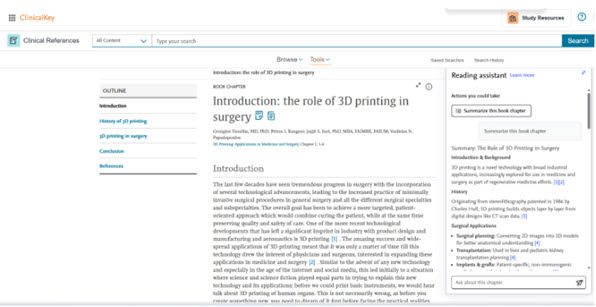
Image 2: Screenshot of Reading assistant example summary and further actions. Credit: Elsevier
When accessing the Study Resources page, users are limited to materials intended to most benefit learners: books, images, videos, and disease summaries. ClinicalKey users can create personal accounts to access more personalized functionality across the Clinical References and Study Resources pages. Some functionality includes saving frequently used resources, creating specific collections of materials for study, tracking CME, and more. Once a personal account is created, ClinicalKey users can then utilize a newer feature called the Bookshelf that allows the user to read eBooks via one’s desktop, laptop, or any mobile device via a mobile app. The Bookshelf feature is available in both landing pages of ClinicalKey. Accessing books in the Bookshelf allows users to have the books read aloud to the user, turning every ebook within ClinicalKey into an audiobook. The Bookshelf also provides functionality such as a variety of choices in font, font size, reading screen mode options (e.g., day, night, cyan, sepia), page margin options, and space between lines, reducing strain and increasing resource accessibility. Other unique functionality includes the ability to highlight text with a variety of different color options.
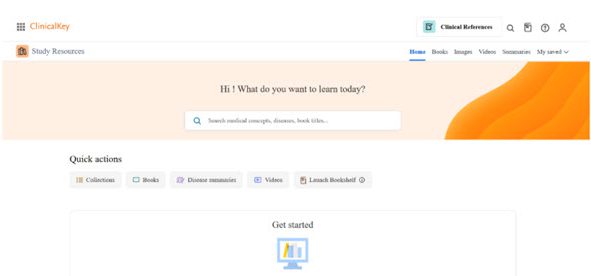
Image 3: Screenshot of Study Resources landing page. Credit: Elsevier
Business Model
ClinicalKey provides both institutional and individual subscriptions. The platform supports EHR integration and API-enabled enterprise deployment. This includes options for ClinicalKey AI on an institutional basis but individual clinicians and residents can access a 14-day free trial of ClinicalKey AI. Medical students in the United States and Canada receive one year of free access to ClinicalKey AI.
Institutional subscriptions include access to both traditional ClinicalKey content and ClinicalKey AI features, if desired, with flexible access options through SMART on FHIR SSO and API integrations. The platform’s link resolver support enables institutions to leverage their existing journal subscriptions alongside ClinicalKey’s proprietary content.1 Pricing information is available through contact with Elsevier’s sales reps.
Breakthrough
For health sciences librarians evaluating clinical decision support resources, ClinicalKey remains a strong contender in a crowded marketplace. Its value comes from ClinicalKey’s breadth of content, spanning reference books, society guidelines, full-text journals and drug information, making it a versatile addition to a collection that serves a clinical or academic medical community. ClinicalKey is best suited for libraries serving clinical end users; just about all practicing healthcare providers can find the content within ClinicalKey of use in their daily work. Health sciences libraries at academic medical centers and teaching hospitals will find the platform’s deep content coverage and EHR integration particularly well-aligned with their user communities’ workflows. For libraries already navigating complex journal licensing portfolios, the link resolver support and expanded full-text journal partnerships may also help reduce gaps in access. Librarians considering this resource should weigh it against their institution’s existing clinical reference holdings and consult with clinical and educational stakeholders about value and integration priorities that come from subscribing to ClinicalKey.
References:
1. ClinicalKey AI. https://www.elsevier.com/products/clinicalkey/clinicalkey-ai
2. ClinicalKey. https://www.elsevier.com/products/clinicalkey
Editor’s Notes
1. As noted throughout, this review is based on a version of ClinicalKey aimed specifically at medical schools. Visuals of specific features as depicted in screenshots may differ depending on the version being used. Information about other versions of ClinicalKey aimed at specific audiences can be found here: https://www.elsevier.com/products/clinicalkey.
2. ClinicalKey was previously reviewed in Doody’s Collection Development Monthly in June 2017 and May 2019.

Leave a comment