

No Comments on A Review of Rayyan 674
Bradley A. Long, MSLS
Embedded Health Sciences Librarian
Harrell Health Sciences Library
Penn State College of Medicine – University Park Regional Campus
Systematic reviews and meta-analyses provide some of the highest levels of evidence, making effective management of these processes essential. Incorporating systematic review software can greatly enhance efficiency and organization. Rayyan, an AI-powered, web-based, multiuser platform developed by the company Rayyan, supports the management of systematic reviews. Available in both free and commercial versions, the platform claims to be trusted by more than one million users. Both free and subscription-based accounts are available.
Features/Functionality
Rayyan offers free accounts that allow users to manage up to three concurrent projects. Completed or stalled projects can be archived, enabling users to maintain the three-project limit for active work. A lead managing collaborator supervises the project. Additional users can join an unlimited number of projects as non-managing collaborators. There is no strict limit on the number of collaborators per project, but it is advisable to keep the team to a manageable number. Rayyan offers additional tips for organizing the review team.
Similar to other systematic review platforms, Rayyan supports importing citations from bibliographic management databases for the purpose of article screening. Common file formats such as .ris and PubMed’s .nbib are easily imported, while BibTeX files may require conversion to .ris. Exporting from EndNote, Mendeley, or Zotero is also supported.
Deduplication is available in all versions. The free version requires manual resolution of duplicates, whereas paid versions offer both manual and automated deduplication.
Dual-level screening is included in all versions and consists of two stages: title/abstract screening followed by full-text screening. Multiple reviewers can independently select “Include,” “Exclude,” or “Maybe,” with the option to revise their choices later. An article advances to the next stage after all reviewers have finalized an “Include” decision. Blinding can be enabled or disabled at each stage; however, it is recommended to disable double blinding at the end of each stage to allow for conflict resolution.
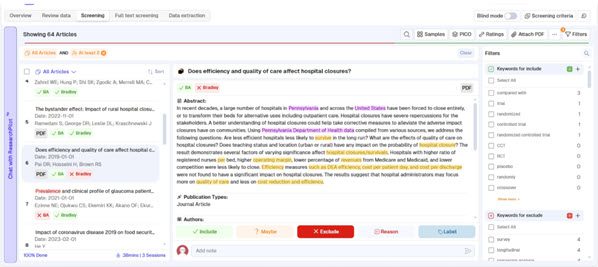
Image 1: Screening page example. Credit: Rayyan
All versions include a keyword-based “Inclusion/Exclusion” feature for focused screening. Reviewers can choose keywords from a ready-made list, primarily related to study designs. Additional keywords can be added if desired. This allows reviewers to conduct more focused screening by pulling out articles that include any of the selected keywords. Similarly, there is also a “Screening Criteria” feature. Instead of using the “Inclusion/Exclusion” keywords, this feature uses AI to identify important concepts within the articles, allowing more focused screening. This process is utilized for both initial and full-text screening.
For full-text screening, PDFs must be uploaded manually to individual records.
Key features provided in paid-only accounts include a “PRISMA” generator, a “PICO” function, and a “Data Extraction” feature.
The “PRISMA” generator extracts data from every step of the screening process to produce an editable PRISMA diagram. Initial results may require adjustments within Rayyan before final generation. The final PRISMA chart is delivered via e-mail.
The “PICO” function is an AI-generated feature that produces keywords based on the PICO framework: Population, Intervention, and Outcome (excluding Comparison). By leveraging AI, Rayyan further streamlines the process of keyword selection and helps to enhance the precision of article screening.
“Data Extraction” is a feature that displays full-text articles, allowing reviewers to capture desired textual and numerical information. The extracted data are entered into a structured form and automatically compiled into an Excel spreadsheet which is delivered via e-mail.
After the conclusion of the screening process, the team can begin writing their manuscript, referring back to Rayyan as necessary.
Rayyan also includes useful, but not extremely robust help at the Rayyan Help Center and on the Rayyan YouTube Channel. Introductory webinars are also available to attend, but are generally taught at the power-user level. Webinar recordings, delivered by e-mail, can be hard to access due to formatting.
Business Model
Rayyan’s business model centers on offering its free version as an entry point to the commercial product. The Professional plan is currently priced at $39.99 per quarter or $99.99 annually, while the scaled-down Student plan costs $24.99 per quarter or $59.99 annually (for more information, see Rayyan Pricing). Additionally, research department and institutional subscriptions are available. Canceling a subscription does not delete user data; access to premium features continues until the subscription expires, after which the account reverts to the free version.
The systematic review software marketplace is highly competitive, with several alternative commercial solutions available, including Covidence, Abstractr, DistillerSR, and the newly launched SysRev. Each product has its own proprietary design, yet they generally provide functionality comparable to Rayyan. Rayyan’s key strength is that users begin with a robust free account and then can decide later if upgrading to a paid account is worthwhile.
Breakthrough
Rayyan represents a cost-effective and popular solution for managing systematic reviews, meta-analyses, and scoping reviews. While the platform is generally intuitive, it does involve a modest learning curve. For institutions that do not subscribe to Rayyan or other systematic review platforms, libraries may consider offering support and training for the free version of Rayyan, as it provides substantial ongoing access rather than a temporary trial.

Leave a comment